
Smart Campus
A one-card platform that brings canteen payment, attendance and access control, library loans and smart water control together on a single campus card.
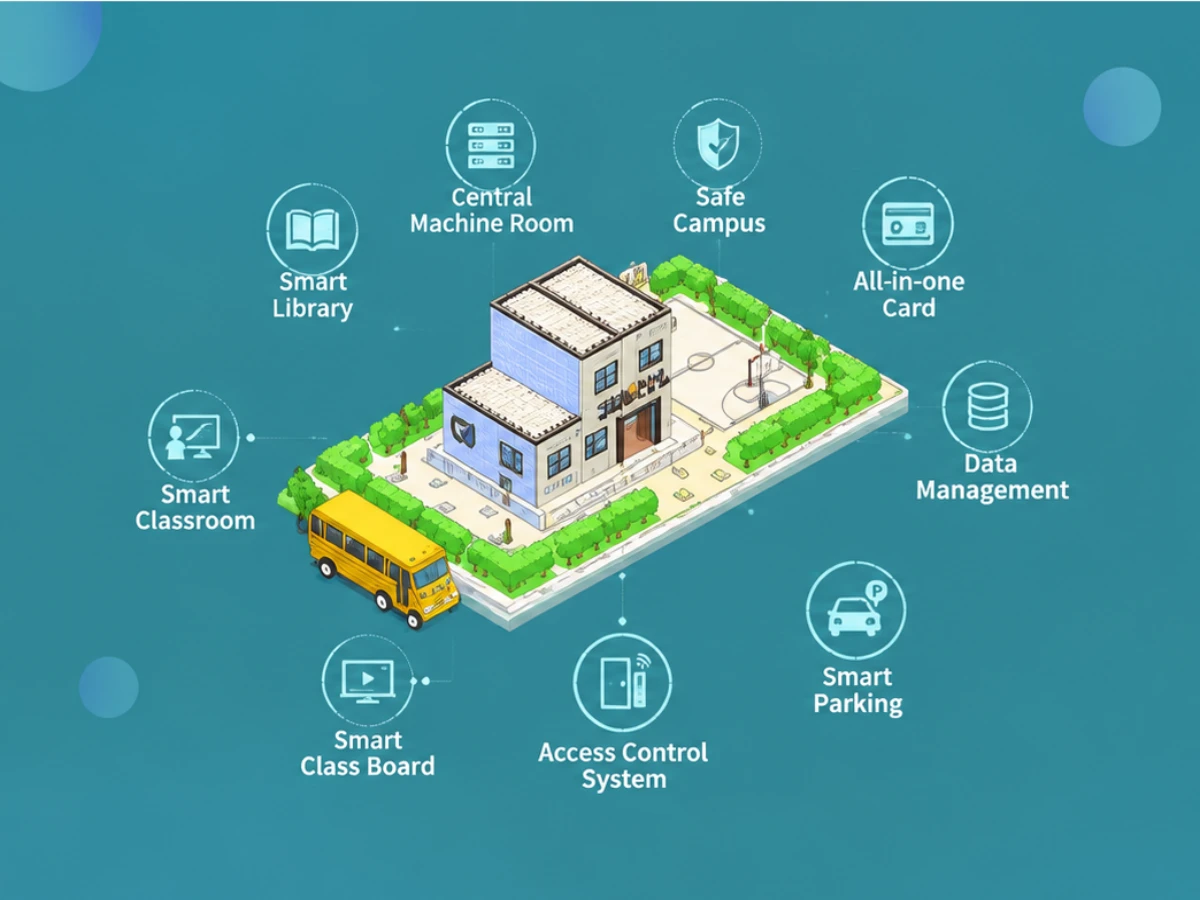
As information and network technologies keep advancing, campus cards are used across more and more scenarios in education: canteen dining, computer-lab access, library borrowing, student records, attendance, door access and identity verification. Traditionally every function ran as a standalone system, so a student had to carry several cards at once. Integrating all of them onto one campus one-card platform makes school management and campus life smarter, safer and fully traceable.
What the Campus One-Card System Covers
Identity verification: library borrowing, door access, attendance and student records all work with a single card. Campus payments: canteens, supermarkets, clinics, convenience stores, bathrooms, laundry rooms and barber shops accept card payment with the same card used for identification. Our goal is a complete internal management and payment system that makes daily life and work smarter for students, teachers and staff.
Why Move to One Card
In-depth research shows most schools face real constraints in both logistics management and personnel management. Campus payments: many schools still rely on cash or set meals in the canteen, while convenience stores, bathrooms and clinics settle in cash or with vouchers. Cash and vouchers spread bacteria between hands, and cash can be lost, stolen or snatched; money in a student's pocket also pushes them off campus toward unhygienic food stalls, internet cafes and arcades — a safety concern for both schools and parents.
Personnel management: most schools still record everything by hand. Personal favouritism and human factors stop rules from being enforced consistently, which loosens discipline and strains relationships. A one-card system turns these processes into objective, logged data.
Situation Analysis
A university usually has thousands of people on campus and large-scale canteens, with broad growth prospects — yet the logistics and personnel challenges facing management keep multiplying. A modern, scientific approach is needed. Our campus one-card system delivers intelligent, standardised and integrated management of campus spending, canteen sales, computer labs, attendance and library borrowing.
Benefit analysis: · Management: no lost, counterfeit or damaged notes or vouchers, and far less labour and cost spent on exchanging, collecting, counting and storing cash. · Investment: one platform covers canteen sales, access control, library loans and computer-lab charging — no duplicated investment. · Hygiene: no more handling cash and serving food with the same hand, cutting cross-contamination. · Students and parents: funds are loaded onto the card, so students carry no cash and their money is safe; parents get a transparent electronic wallet and can make every cent go where it should. · Operators: revenue leaks are closed, labour is saved, statistics come automatically and queues move faster. · Accounting: cardholders can query any transaction by time and outlet, protected by daily limits and password. · Identity: one card is one identity, and every library or door record is reported automatically instead of manually. · Control: attendance rules can be tailored per scenario or grade, operators work under role-based permissions, and every critical action is logged.
Payment (POS) Management System
One campus card can be extended to cover canteen meals, computer-lab charging, convenience stores, boiled and hot water, the school clinic and dormitory water control. The system is built to: · collect, process and store consumption data comprehensively, accurately and in real time, raising management efficiency; · handle daily operations — loss report, unblocking, correction, card replacement, account opening/closing, monthly subsidy — quickly and with immediate effect; · require an operator password and a cashier authorisation card for cash handling, with every step recorded; · keep separate accounts per business unit, with daily and monthly settlement plus printable financial reports; · stay practical, sufficient and easy to use today, and scale for tomorrow; · optionally support automatic transfer from a linked bank card.
Design Principles
· Mature, reliable and advanced technology: RF cards have proven themselves in campus payment for years — stable even under demanding conditions. · Open, flexible and easy to manage: requirements evolve, so the system extends smoothly toward true campus-wide "one card". · Best value for money: maximum efficiency with minimum investment, without compromising performance. · Continuous upgrade: software keeps evolving — software upgrades are free, hardware upgrades are charged at cost only.
System Architecture
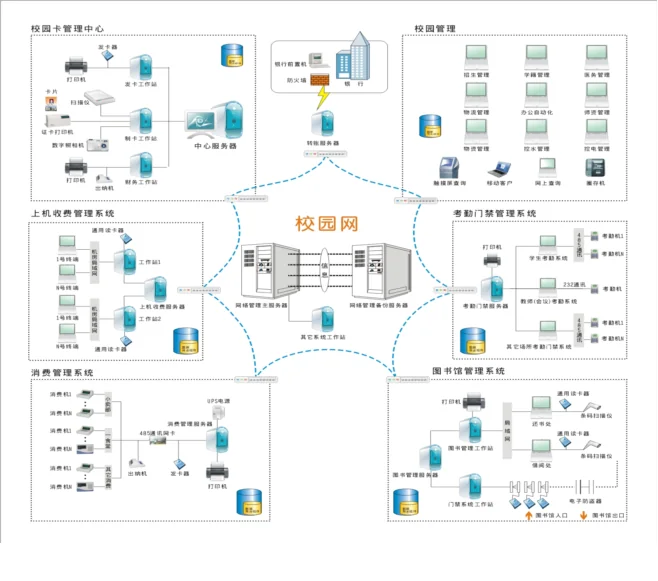
· Central server room: hosts the campus-card workstation connected to the communication network. It handles card services — account opening and closing, enquiry, loss report, unblocking and replacement — and supervises every canteen POS terminal, including settlement and statistics. A dedicated RS-485 bus controller runs trunk lines from the workstation to the canteens, forming the backbone of the POS network. · Communication network: RS-485 trunks using shielded twisted pair, up to 1,200 m per run, easy to branch out, simple to install. · POS terminal groups: each point of sale is wired as a group on the bus. Both wall-mounted and desktop terminals support Wi-Fi or 4G, so no field cabling is required. NG7105 and NG7105G are recommended for campus deployment.
POS Terminal Features
· Numeric keys enter the amount (decimals in tenths); a statistics key shows current headcount and card revenue; cancel, function-shift and confirm keys cover every operation. · Supports both manual amount entry and fixed auto-deduction — one tap completes the payment, with the balance on the left display and the deducted amount on the right. · Payment alarms: an invalid card value shows Error B with three beeps, insufficient balance shows Error C, and blacklisted (reported-lost) cards show Error A so staff can confiscate them. · A dedicated encryption security module in every terminal blocks unauthorised external IC cards; each unit works standalone or networked. · Stores up to 36,000 transactions with live totals, and dual displays face both the customer and the operator. · The monthly subsidy can be credited automatically on the first card tap of the month.
POS Terminal Specifications
· CPU 1.8 GHz RK3568, ARM quad-core Cortex-A55; Android 11; 2 GB RAM; 32 GB eMMC · Operator display: 5" colour RGB TFT, 800×480, 16:9, hardened scratch-resistant glass · Customer display: 7" colour MIPI TFT, 1024×600, G+G capacitive multi-touch, hardened · Camera: 2 MP wide dynamic with fill light · Payment methods: face, NFC, physical card, QR code (optional) · Connectivity: Wi-Fi, RJ45 Ethernet, 4G (optional) · Housing: ABS, available in porcelain white, sapphire blue and night black · Power: 100-240 V input, DC 12 V/3 A output; 3,500 mAh backup battery, 3-4 hours after power loss · Operating -10 °C to 50 °C; storage -40 °C to 80 °C; humidity 95% non-condensing · Dimensions 288×255×120 mm; face library 20,000 templates (expandable) · Modes: manual, fixed, menu, download, set-meal, count-based and time-based · USB data collection and switchable voice prompts
Choosing the Campus Card
Cards on the market fall into two main families: general-purpose RF cards and contact IC cards. · Contact IC cards: poor environmental tolerance for canteen conditions — not recommended. · Read-only RF cards (EM): low cost, simple and convenient to use — recommended. · Large-capacity read/write RF cards: the most advanced RF option today, 8 Kbit storage split into 16 sectors, each with its own password (one card, one key) — recommended. Depending on actual usage and requirements, we recommend read/write or read-only RF cards.
Attendance and Access Control
The attendance and access-control system manages entry and exit for students, teachers and staff — school gates and dormitories included — with a friendly interface and strong generality. Managers see immediately who came and went, which improves dormitory management and solves its hardest problem: security. Rules can be tailored for morning exercise, class start and end, leave applications, or by grade and identity. The same card also enables gate attendance, dormitory check-in/out and sports-facility access.
Face Recognition Access Attendance Terminal (NGMJ-IA1-RF)
· Up to 99.9% face recognition accuracy; offline recognition and offline gate opening supported · Low-light imaging, front-lit and back-lit recognition · RK3399 hexa-core Cortex-A72 1.8 GHz; Android 7.1; 4 GB RAM; 16 GB eMMC · 8" colour MIPI TFT, 1280×800, G+G capacitive multi-touch, hardened · 2 MP wide dynamic camera with fill light · Identity methods: face, NFC, physical card, QR code (optional) · Connectivity: Wi-Fi, RJ45, 4G (optional); aluminium alloy body; DC 12 V/2 A; -10 °C to 60 °C · Dimensions 260×133×24 mm; face library 20,000 templates (expandable) · Remote configuration and remote maintenance — remote upgrade and remote import of personnel and face photos · Time-slot, weekday and category based permissions · Interfaces: 1 switch output, 1 Wiegand input, 1 Wiegand output · Suitable for door access, pedestrian gates, dormitory management and attendance
Library Management System
· Client/server architecture keeps network traffic minimal, improves data security and removes any per-seat licence limit. · Works with enterprise databases such as Oracle, Informix or SQL Server; the choice stays with the user. · Standard MARC storage means imported external MARC data loses nothing, paving the way for shared cataloguing. · Loan quota and borrowing days can be set by book category, collection location and reader level. · Clean menus and guided operations; both simple cataloguing and CNMARC template entry are supported. · Real-time plus scheduled backups from server to workstation; every operation except enquiry requires an authorised client. · Canteen IC cards double as library cards — dine and borrow with one card.
Functional modules cover the full library workflow: acquisition, cataloguing, printing, retrieval and statistics, circulation, serials and system maintenance. · Acquisition: order duplicate checking, order printing, new-book arrival registration, invoice checking and order reminders, all sharing data with cataloguing. · Cataloguing: automatic ISBN and title duplicate checking, auto-generated title pinyin and search terms, barcode printing, external MARC import, label and card printing, collection registration and statistics. · Circulation: reader card issuing, printing, loss reporting and cancellation; book lending, return, damage and loss registration; fine lists, overdue notices and statistical reports. · Serials: subscription editing and enquiry, check-in, borrowing records and bound-volume cataloguing. · Retrieval: local search by any keyword — title, author, publisher, search term, pinyin or classification — plus new-book browsing, loan enquiry and online reservation.
Water Control System
The smart-card water-saving system consists of a host computer, UPS, printer, smart-card water controller, management software, smart cards, communication card, card issuing/top-up unit, water-saving valve (solenoid or electric) and a flow sensor when billing by volume. Water control funds sit in an independent card sector and are loaded from the management computer. Consumption totals are collected back with a collector card, so the system can run without networking — or be integrated into the wider one-card platform.
Water Control Software Modules
· Basic data: departments, personnel categories, card types, controller parameters, outlets, controllers, operators, authorisation cards and system parameters. · Accounts: card issuing, top-up, cancellation, enquiry and profile changes. · Device data: collector card creation and reading, networked collection, parameter and profile download. · Financial reports: settlement queries and report printing. · Operation details: queries and reports by operator, controller or outlet, plus a log of every critical step. · System maintenance: manual data backup and system lock.
Working Modes
Three modes are available and selected by the user: 1. Flow mode — the card stays in the sensing area, the balance is counted down unit by unit and water keeps flowing until the card is removed (it can also be set to stop when the balance runs out). 2. Pre-deduction mode — a preset amount is deducted first; tapping the card again refunds the unused balance and stops the water, or the water stops when the pre-deducted amount is used up. 3. Fixed mode — a fixed amount is deducted and the water stops once that amount is consumed.
Water Controller Features
· Fully waterproof housing with infrared sensing instead of mechanical keys — simpler shape, better sealing, easier to use. · Dual card plus infrared control: insert to start, remove or wave to stop — more human and water-saving. · Time-based or volume-based billing, whichever is fairest. · E-wallet recording only totals; a collector card retrieves the data, so no complex networking and far less installation work. · Easy to install on top of an existing payment system — existing personnel data can issue cards directly, extending the system toward a full one-card solution. · Runs standalone (online or offline) or with the POS system, using a dedicated transfer unit to move balance between sectors. · Selectable electric or solenoid valve; minimum billing unit, units per deduction, whether water stops immediately after the card is removed, and the allowed pause time are all configurable.
Hardware Notes
· Where it works: anywhere with a tap — bathrooms, dormitories, boiled-water rooms and laundry rooms. Designed for waterproofing, safety, practicality and simple operation, with second-level timing accuracy; parameters download from the host computer or a parameter card, making installation, service and replacement straightforward. · Saving energy: the valve only opens when a card is present and closes automatically once it is removed, which eliminates continuous-flow waste and keeps users aware of what the water costs them. · Power: controller and valve run on 12 V DC safety voltage with low-power coils, no high or AC voltage. A central 220 V to 12 V transformer supplies the units, backed by a battery — one 12 V 6 Ah unit typically supports around six controllers. · Waterproofing: waterproof housing, waterproof cable glands and a rubber gasket between the covers keep water and steam out. Wiring is best run inside walls during decoration, or in conduits where walls cannot be modified. · Applications: bathroom and boiled-water billing saves both water and energy; laundry charges by actual time; even drinking fountains can be metered. · Valve selection: valves must be waterproof and low voltage, and different valves are used for bathrooms and boiled water to avoid scale blockage (or a strainer is added). Choose by five criteria — durability, appearance, economy, safety and waterproof rating.
System Security
Our products have proven themselves across hundreds of installations, with continuously improving functionality and quality. · Data storage: the architecture follows financial-grade security practices and combines card, terminal and host computer into one "three-in-one" protection scheme. Every record carries complete holder information, and each card has a globally unique read/write password. · Database protection: automatic daily backups with key data permanently retained; terminal workflows and every transaction are logged in detail, and a daily backup allows full recovery after any failure. · Terminal protection: passive storage components keep data intact for more than ten years; operators work under graded permissions and key data is encrypted, leaving no room for tampering. · Waterproofing: controllers are built for wet environments, sealed with gaskets and adhesive so steam and water cannot damage the electronics.