
Smart Canteen
Card, QR code and face payment at the serving window, with automatic settlement, subsidies and consumption reports.
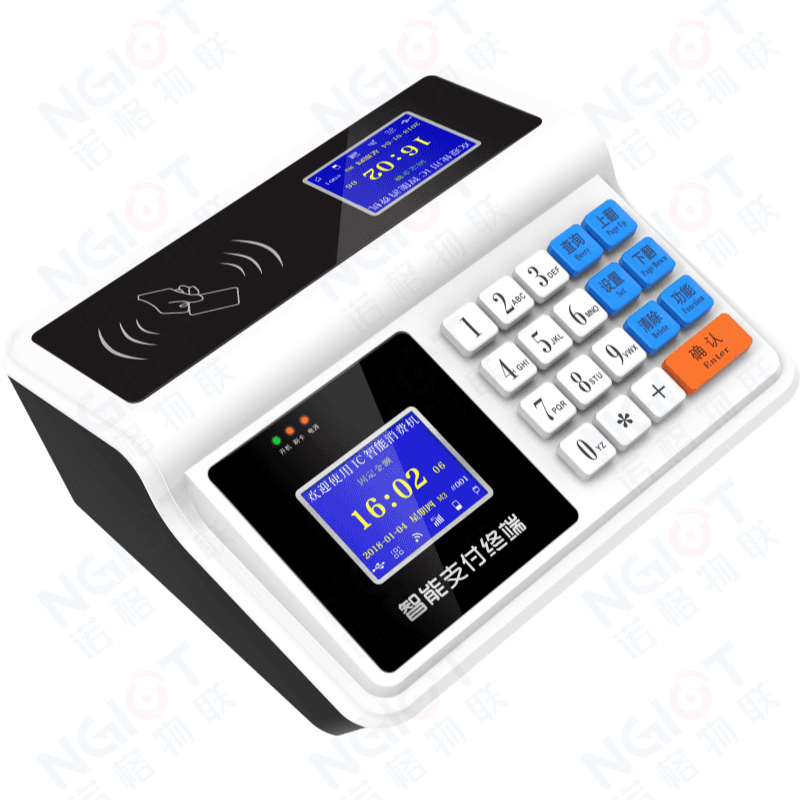
The canteen is where a campus card carries the heaviest load: thousands of transactions land inside a serving window shorter than two hours, so it is usually the first place — and the toughest — to move off cash. NGIOT's canteen payment system puts card, QR code and face recognition terminals at the serving window and a single management platform behind them. Cardholders pay with a tap, settlement and subsidies run automatically, and paper meal vouchers with hand counting are gone for good. This page walks through the whole system, from the problems it solves to the terminal specifications.
What Cash Really Costs a Canteen
Cash and paper vouchers: many school canteens still settle in cash or serve set meals, and the specialist counters and tuck shops around them run on notes and meal coupons. Notes and coupons pass through dozens of hands, carrying bacteria along the way; cash gets lost, snatched or stolen. Money in a student's pocket also pushes them off campus toward unhygienic food stalls, internet cafes and arcades — a safety and welfare worry for both the school and parents. Running the window: manual tallies leave room for leakage, cash and vouchers have to be exchanged, collected, counted and stored, and making change slows the queue — which directly caps how many people can be served at lunch.
Situation Analysis
A school canteen serves thousands of people a day across several windows, and the list of things to keep under control keeps growing: food safety, cost, and reliable trading figures on top of it all. Management needs a modern, scientific way to run it. Our canteen payment system turns every transaction at the window into queryable data — time, amount, serving window, operator and remaining balance are recorded every time — so canteen sales can be managed intelligently, standardised and on evidence.
Benefit Analysis
· From the school management angle: no vouchers or notes lost, counterfeit or spoiled in circulation, and far less labour, material and money spent on exchanging, collecting, counting and storing cash. · From the school investment angle: the system extends toward a single card, so canteen sales, access control, library loans and computer-lab charging are all handled by one card — no duplicated investment. · From the food hygiene angle: no more accepting change with one hand and serving food with the other, which cuts the cross-contamination that notes and vouchers carry. · From the student's money angle: funds loaded onto the card mean students carry no cash and their money is safe; a modern electronic wallet costs parents little and makes every cent go where it should. · From the canteen management angle: revenue leaks are closed, labour is saved, consumption statistics are at hand, serving speeds up and efficiency rises. · From the accounting angle: cardholders can query any transaction by time and window, protected by spending limits and a password for the funds.
Payment (POS) Management System
One card can be extended to cover canteen meals, boiled and hot water, the tuck shop and the school clinic, and later be joined to other spending points across the campus. The system is built to: · collect, process and store consumption and management data comprehensively, accurately and in real time, raising management efficiency; · handle daily operations — loss report, unblocking, correction, card replacement, account opening and closing, monthly subsidy — quickly and with immediate effect; · require an operator password and a cashier authorisation card for cash handling, with every step recorded; · keep separate accounts per business group, with daily and monthly settlement plus printable financial reports; · stay practical, sufficient and easy to use today, and scale for tomorrow; · optionally support automatic transfer from a linked bank card.
Design Principles
· Mature, reliable and advanced technology: RF cards have proven themselves in campus payment for years — stable even under demanding conditions, and well matched to a busy canteen. · Open, flexible and easy to manage: requirements grow with the scale and the surroundings, so the system extends smoothly toward true campus-wide “one card” payment management. · Best value for money: the greatest return on the smallest investment, without compromising performance. · Continuous upgrade: software upgrades are free and hardware upgrades are charged at cost only.
System Architecture
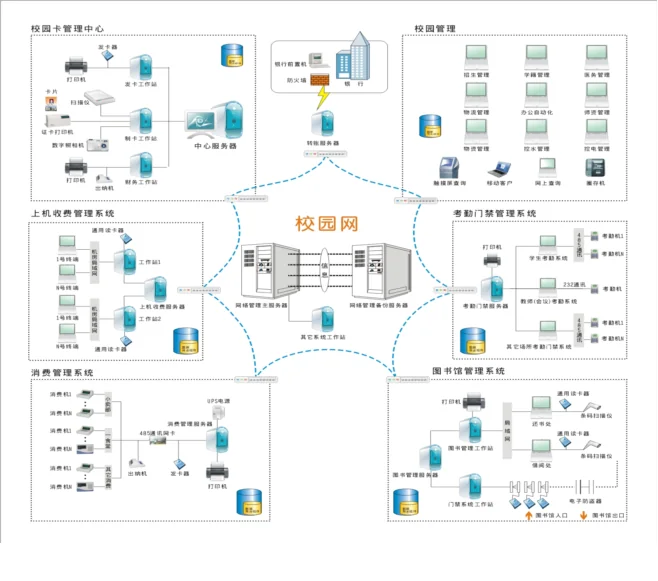
· Central server room: hosts the card system workstation connected to the communication network. It handles card services — account opening and closing, enquiry, loss report, unblocking and replacement — and supervises every canteen POS terminal, including settlement and statistics. A dedicated RS-485 bus controller inside the workstation runs trunk lines out to the canteens, forming the backbone of the payment network. · Communication network: RS-485 trunks using shielded twisted pair, up to 1,200 m per run, easy to branch out, simple to install. · POS terminal groups: each serving point is wired as a group on the bus. Both wall-mounted and desktop terminals support Wi-Fi or 4G, so no field cabling is required. NG7105 and NG7105G are recommended for school canteens.
POS Terminal Features
· Numeric keys enter the amount (decimals in tenths); a statistics key shows current headcount and card revenue; cancel, function-shift and confirm keys cover every operation. · Supports both manual amount entry and fixed auto-deduction — one tap completes the payment, with the balance on the left display and the deducted amount on the right. · Payment alarms: an invalid card value shows Error B with three beeps, insufficient balance shows Error C, and blacklisted (reported-lost) cards show Error A so staff can confiscate them. · A dedicated encryption security module in every terminal blocks unauthorised external IC cards; each unit works standalone or networked. · Stores up to 36,000 transactions with live totals, and dual displays face both the diner and the operator. · The monthly subsidy can be credited automatically on the first card tap of the month, and the previous month's subsidy can be carried over or cleared.
POS Terminal Specifications
· CPU 1.8 GHz RK3568, ARM quad-core Cortex-A55; Android 11; 2 GB RAM; 32 GB eMMC · Operator display: 5" colour RGB TFT, 800×480, 16:9, hardened scratch-resistant glass · Customer display: 7" colour MIPI TFT, 1024×600, G+G capacitive multi-touch, hardened · Camera: 2 MP wide dynamic with fill light · Payment methods: face, NFC, physical card, QR code (optional) · Connectivity: Wi-Fi, RJ45 Ethernet, 4G (optional) · Housing: ABS, available in porcelain white, sapphire blue and night black · Power: 100-240 V input, DC 12 V/3 A output; 3,500 mAh backup battery, 3-4 hours after power loss · Operating -10 °C to 50 °C; storage -40 °C to 80 °C; humidity 95% non-condensing · Dimensions 288×255×120 mm; face library 20,000 templates (expandable) · Modes: manual, fixed, menu, download, set-meal, count-based and time-based · USB data collection and switchable voice prompts
Choosing the Card
Cards on the market fall into two main families: general-purpose RF cards and contact IC cards. · Contact IC cards: poor environmental tolerance for canteen conditions — not recommended. · Read-only RF cards (EM): low cost, simple and convenient to use — recommended. · Large-capacity read/write RF cards: the most advanced RF option today, 8 Kbit storage split into 16 sectors, each with its own password (one card, one key) — recommended. A canteen combines heat, steam, grease and rushed handling, so we recommend read/write or read-only RF cards rather than anything that has to be inserted and rubbed against contacts.
System Security
· Data storage: the architecture follows financial-grade security practices and combines card, terminal and management computer into one “three-in-one” protection scheme, with a globally unique read/write password on every card. · Database protection: automatic daily backups with key data permanently retained; terminal workflows and every transaction are logged in detail, and a daily backup allows full recovery after any failure. · Terminal protection: passive storage components keep data intact for more than ten years; operators work under graded permissions and key data is encrypted, leaving no room for tampering.